After my blog post about running your own AI locally, I received some feedback regarding my arguments against using AI. Today, I'd like to respond to that feedback, but also I want to make a note for myself about how to use your locally run AI model via the API, rather than directly typing in the prompt of Ollama.
Using Ollama via API
So, first things first. How to use the API. Begin by launching the AI. In this case, I downloaded a bigger and better AI model, llama3.3 with 8B, or 8 billion parameters, as opposed to the llama3.2 model I was using that only had 3 billion parameters. I pulled it like so:
$ ollama pull llama3:8b
pulling manifest
pulling 6a0746a1ec1a: 100% ▕██████████████████████████████████████████████████████████ ▏ 4.7 GB/4.7 GB   10 MB/s      0s
pulling 4fa551d4f938:  30% ▕█████████████████                                          ▏ 3.7 KB/ 12 KB
pulling 3f8eb4da87fa: 100% ▕███████████████████████████████████████████████████████████▏  485 B
verifying sha256 digest
writing manifest
success
Nothing new, we did this in the last article. Then I run the new model:
alaskalinuxuser@alaskalinuxuser-CF-52NKE102M:~$ ollama run llama3:8b
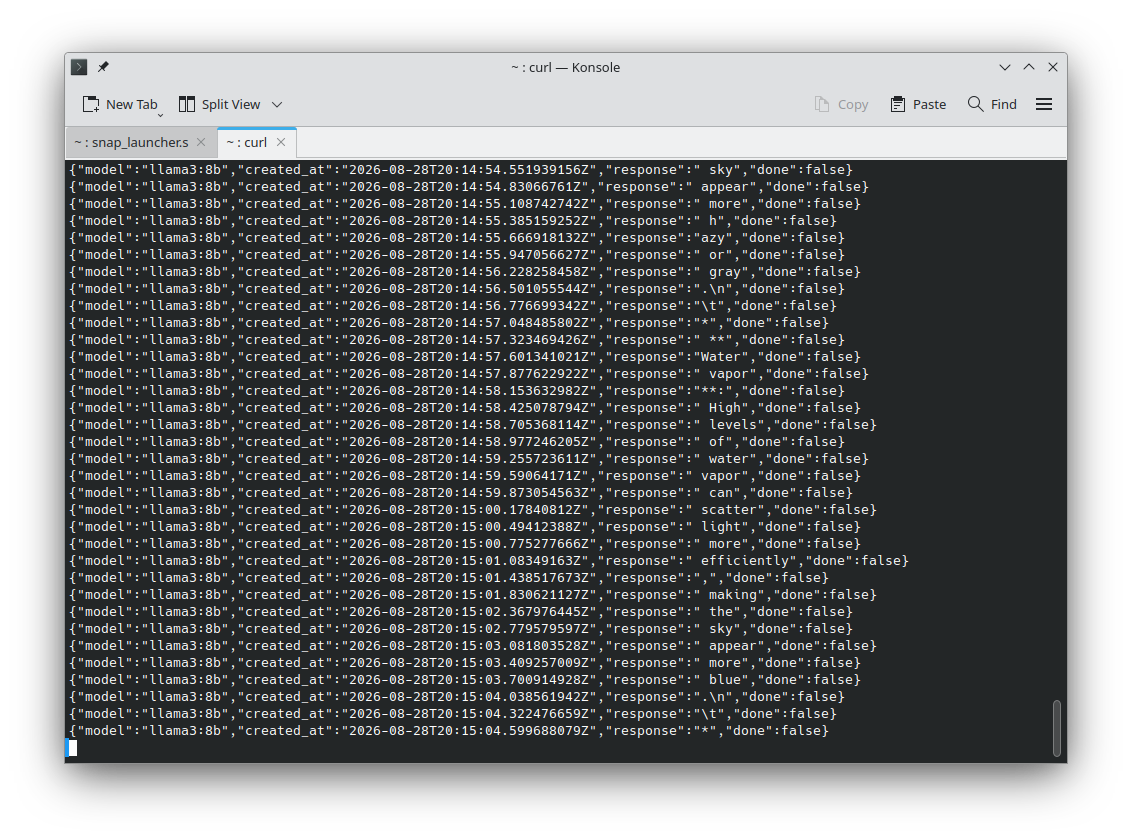
Now that llama3.3 is running, I then open another terminal, and type this in it:
$ curl -X POST http://localhost:11434/api/generate -d '{
  "model": "llama3:8b",
  "prompt":"Why is the sky blue?"
 }'
Here I'm just using curl to call and pull the output from the API. Essentially, I give it a destination (localhost) a port number (11434), and tag which running model I want (note it will not start a model that is not running) and enter my prompt. Pretty simple. I just wanted to write this down so I can reference it later. Though I suppose I could have just asked llama....
Responses to questions about my previous AI article.
In my previous article [1] about AI models, I pointed out how you couldn't trust AI because it:
- Hallucinates or makes things up.
- Often has errors or is inacurate.
- Takes more time to review it's output than to make it yourself.
- Doesn't make you smarter.
From which I received several pieces of feedback, but the most interesting one was that I am not using a good AI model, or that there are better AI models which will have better performance and thus better results. I agree fundementally with that argument. There are better AI models out there, and some will likely give better performance. I'd like to propose, though, that my arguments against using them are still vallid. Let's take a quick look at AI models so we understand a little more before we begin:
AI models have parameters. These are the "buttons", "boxes", "switches", or "knobs" of the model, which allow it to make the output. My previous article was using the llama3.2 model with 3 Billion parameters. The model I just downloaded today has 8 Billion parameters. In theory, the more parameters, the better the model works. Think of a photograph, the higher the resolution, the better the photo. AI models also have different training methods. They can be "constitutional", where they are given a constitution, a set of rules, and as it makes output, it checks that against the rules and determins if it is good output or not. A ficticious example would be a constitution for a cat drawing program that has rules like: "All cats will have one tail, four paws, and two ears on the top of their head." If it draws a cat that has two tails, it throws it out, because that doesn't meet the rules. The other method of training is real life human feedback, where a person gives the output a score, rewarding good output. Real life human feedback is a bit more expensive, but seems to produce better results, though may suffer from bias of the human.
My counter to this argument is that no matter how good the AI model is, my four points are still valid to some degree. If the AI model makes any inacuracies or errors, or hallucinates/make things up at all, you will still have to review all of it's output to be sure that it is correct. Also, I submit that the better the AI model, the less brain activity you will use, as you offload more tasks/though process to the AI model, and actually accentuates my point about AI models not making you smarter.
But if that's the case, we should be able to test and verify that. The previous article I asked llama3.2:3B to tell me the rules of chess. How about we ask llama3.3:8b the same question. Since it has 5 Billion more parameters, perhaps it will get it right? Let's see:
alaskalinuxuser@alaskalinuxuser-CF-52NKE102M:~$ ollama run llama3:8b
>>> can you tell me the rules of chess?
The rules of chess! Yes, I'd be happy to explain them to you. Here's a comprehensive guide to get you started:

**The Basics**

1. The game is played on a square board with 64 squares, alternating in color between light and dark.
2. Each player starts with 16 pieces: one king, one queen, two rooks, two knights, two bishops, and eight pawns.
3. The objective is to checkmate your opponent's king (put the king in a position where it's in danger of being
captured, and there's no way to move the king out of capture).

**The Pieces**

1. **King**: The most important piece. If your king is in check, you must move it to a safe square or block the
check with another piece. If your king is checkmated, you lose.
2. **Queen**: The most powerful piece, able to move in any direction (horizontally, vertically, or diagonally) any
number of squares.
3. **Rook**: A piece that can move horizontally or vertically any number of squares.
4. **Bishop**: A piece that can move diagonally in any direction.
5. **Knight**: A piece that moves in an L-shape (two squares in one direction, then one square to the side).
6. **Pawn**: The foot soldiers. Pawns can move forward one square, but capture diagonally one square.

**How the Pieces Move**

1. **King**: One square in any direction (horizontally, vertically, or diagonally).
2. **Queen**: Any number of squares in any direction (horizontally, vertically, or diagonally).
3. **Rook**: Any number of squares horizontally or vertically.
4. **Bishop**: Any number of squares diagonally.
5. **Knight**: Two squares in one direction, then one square to the side (L-shape).
6. **Pawn**: Forward one square, but captures diagonally one square.

**Special Moves**

1. **Castling**: A special move that allows the king to move three squares towards a rook, while the rook moves to
the square the king crossed. This is the only move that allows the king to move more than one square.
2. **En Passant**: A pawn can capture an opponent's pawn "en passant" if the opponent's pawn moves two squares
forward from its starting position, landing adjacent to your pawn. You can capture the pawn as if it had only moved
one square.
3. **Promotion**: When a pawn reaches the opponent's end of the board, it can be promoted to any piece (except a
king).

**Check and Checkmate**

1. **Check**: When a player's king is under attack, it's said to be "in check." The player must move their king to
a safe square or block the check with another piece.
2. **Checkmate**: When a player's king is in check and there's no way to move the king out of capture, it's
checkmate, and the game is over.

**Other Rules**

1. **Capturing**: A piece captures an opponent's piece by landing on the square occupied by that piece.
2. **Blocking**: A piece can block a capture by moving into the square the opponent's piece was trying to capture.
3. **Draw**: If both players agree to end the game with a draw, or if the same position occurs three times
(including the initial setup), the game is a draw.

That's it! With these rules, you're ready to start playing chess. Remember, practice makes perfect, so don't be
afraid to make mistakes and learn from them. Happy chess-ing!

>>> exit
It was nice playing chess with you! If you want to play again or need help with anything else, feel free to ask.
Otherwise, I'll exit and wait for your next question. Bye for now!

>>> /bye
Just a few points here, there may be more if we dig into it, but under "The Basics" and "Check and Checkmate", the only two methods listed to get out of check are to move the king to safety or block (interpose) with a piece. This neglects the option to capture the oposing piece. Okay, maybe it just forgot that one. No problem, right?
How about under "The Pieces" and "How the Pieces Move", both don't list that a pawn can move forward two squares from the starting position. Just an oversight, I'm sure.
Or, under "Special Moves", it says that to castle, the king moves three squares. Except a king only moves two squares. This is wrong, or inacurate, information. It also doesn't cover not castling across check, and that the other pieces must not be in the way, but that may be nit-picking on my part.
I think this AI model is hallucinating, because under "Other Rules" it says that "A piece can block a capture by moving into the square the opponent's piece was trying to capture." Which is incorrect.
The AI also doesn't mention stalemate as an option under "Draw". So at best this is not a full list of chess rules, with the above being incorrect.
Now, it did do "better" than llama3.2, but still missed the mark. What was interesting though, is when I went to leave, I erroniously typed "exit", to which it thanked me for playing a game of chess with it. But I didn't play llama3.3 a game of chess, so why did it say that? Well, because it is a statistics based predictor, not artificially intelligent.
But okay, it was still a really low grade model compared to using the "big guns" that Google runs, right? So I decided to go online, to Google, and ask the AI model there to play me a game of chess. You will need a board to see this, but here was the game we played:
1. e4 c6
2. d4 d5
3. e5 c5
4. c3 cxd4
5. cxd4 Nc6
6. Nf3 Bg4
7. Be2 e6
8. O-O Qb6
9. Nc3 Bxf3
10. Bxf3 Qxd4
11. Qxd4 Nxd4
12. Bd1 a6
13. Be3 Nc6
14. Rac1 Nxe5
15. Rfe1
You play Nxe5, capturing my unprotected central pawn! However, this leaves your knight vulnerable to a tactical reply.I will use my rook to pin your knight to your un-castled king along the open e-file:14... Nxe515.

Rfe1

The game history so far:
e4 c6d4 d5e5 c5c3 cxd4cxd4 Nc6Nf3 Bg4Be2 e6O-O Qb6Nc3 Bxf3Bxf3 Qxd4Qxd4 Nxd4Bd1 a6Be3 Nc6Rac1 Nxe5Rfe1 ...Your turn!

Your e5-knight is now pinned against your king, and my e3-bishop is also eyeing the f4 square to add more pressure. How will you defend or escape the pin?What is your next move? You could choose to:Defend the knight with f6 or Bd6Move your king out of the potential line of fire by preparing to castle
If you play this out on a real board, you will see that my knight is not pinned to my king. There are still a pawn and bishop on that file, as well as the knight, between my king and the newly moved rook. The supposed "big guns" Google ChatGPT is either hallucinating or made an error/inacuracy in judgement by not just one piece, but two pieces. Thus, back to my original thoughts on AI, I don't feel that it is trustworthy. Certainly not trustworthy with your health, or financial data, and probably best avoided, even for mundane and simple tasks. Again, I'm not concerned with this AI model's lack of skill at the game of chess. Computers have beat people for over a decade now, but rather that the output of this, or maybe all AI models is/are untrustworthy. Yet this is one of the most used AI models in existence, since everyone just "Googles" everything nowdays, and it is enabled by default on most browsers.
This does beg the question, though: which AI model are you getting when you go to a website or use an online based tool? Hmmm.... Things to ponder.
I personally hope to stay away from AI, with the exception of doing the learning I need to do in order to understand how to use it, even if I don't intend to do so.
Linux - keep it simple.